Why AI Stalls in Education, and How to Get Past the Five Frictions
In short: Most institutes do not fail at AI because the technology is weak. They stall on five practical frictions: scattered data, tools that add work, generic AI that ignores the syllabus, software that cannot be shaped, and no baseline to prove return. A connected system that does the admin work, fits the way an institute already runs, and shows its savings in hours is how adoption gets unstuck. This is how we think about it at Splandesk.
The pitch everyone has heard
Every school and coaching leader has heard the promise. AI will draft the question papers, grade the answer sheets, spot the struggling student early, and give teachers their evenings back.
Then they walk back into the office. The timetable is a spreadsheet with colour-coded cells. Fees live in a register. Question papers sit in a folder structure that one person understands. Marks are in three places, and the third is a teacher's notebook.
The gap is not between the institute and AI. It is between the institute and the first useful step.
We build Splandesk, an operating system for institutes, so we see this gap every week. What follows is the pattern, in the order we usually meet it.
Friction 1: The data lives in four places
An institute rarely has one system. It has a timetable tool, a fee register, a folder of papers, an attendance sheet, and a messaging group. Each is fine alone. Together they disagree.
AI cannot help a team whose facts are scattered. A model asked to suggest a batch schedule needs to know teacher availability, room capacity, exam dates and syllabus coverage. If those sit in four places, someone has to gather them by hand first, and that someone is usually a coordinator who is already full.
What clears it: one connected system where the timetable, papers, attendance, fees and analytics share the same records. Splandesk runs as 21 connected modules for this reason. The value is less in any single module than in the fact that they agree.
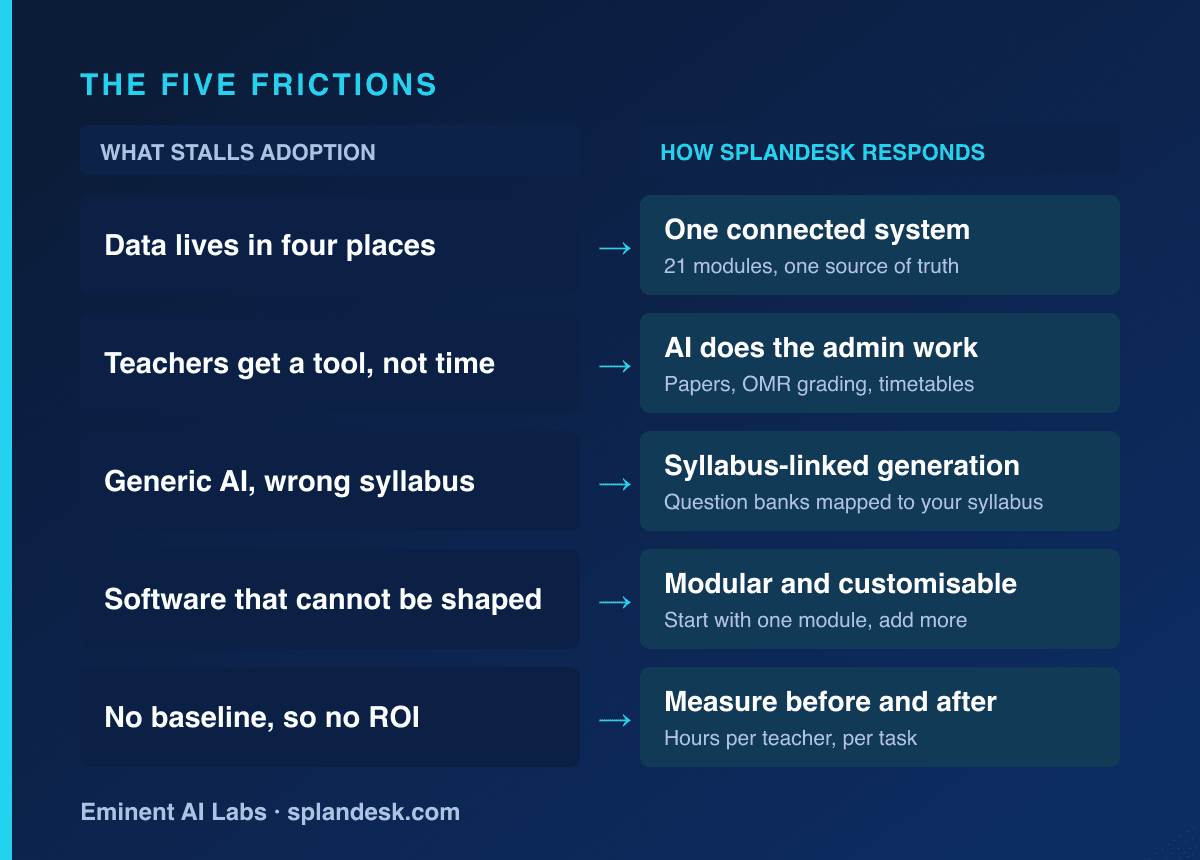
Figure 1. The five frictions, and the practical response to each.
Friction 2: Teachers get a tool, not time
A new tool is a new thing to learn, a new login, a new place to enter marks. If AI arrives as another dashboard to check, it competes with teaching for the same scarce hours.
The test we use: after the first month, does a teacher have fewer things to do, or more? If the answer is more, adoption will fade by the second term, however good the demo looked.
What clears it: let the AI take the work that no one wanted in the first place. Building a clash-free timetable, generating a question paper from a syllabus, grading an OMR sheet. Teachers see the output, not another chore.
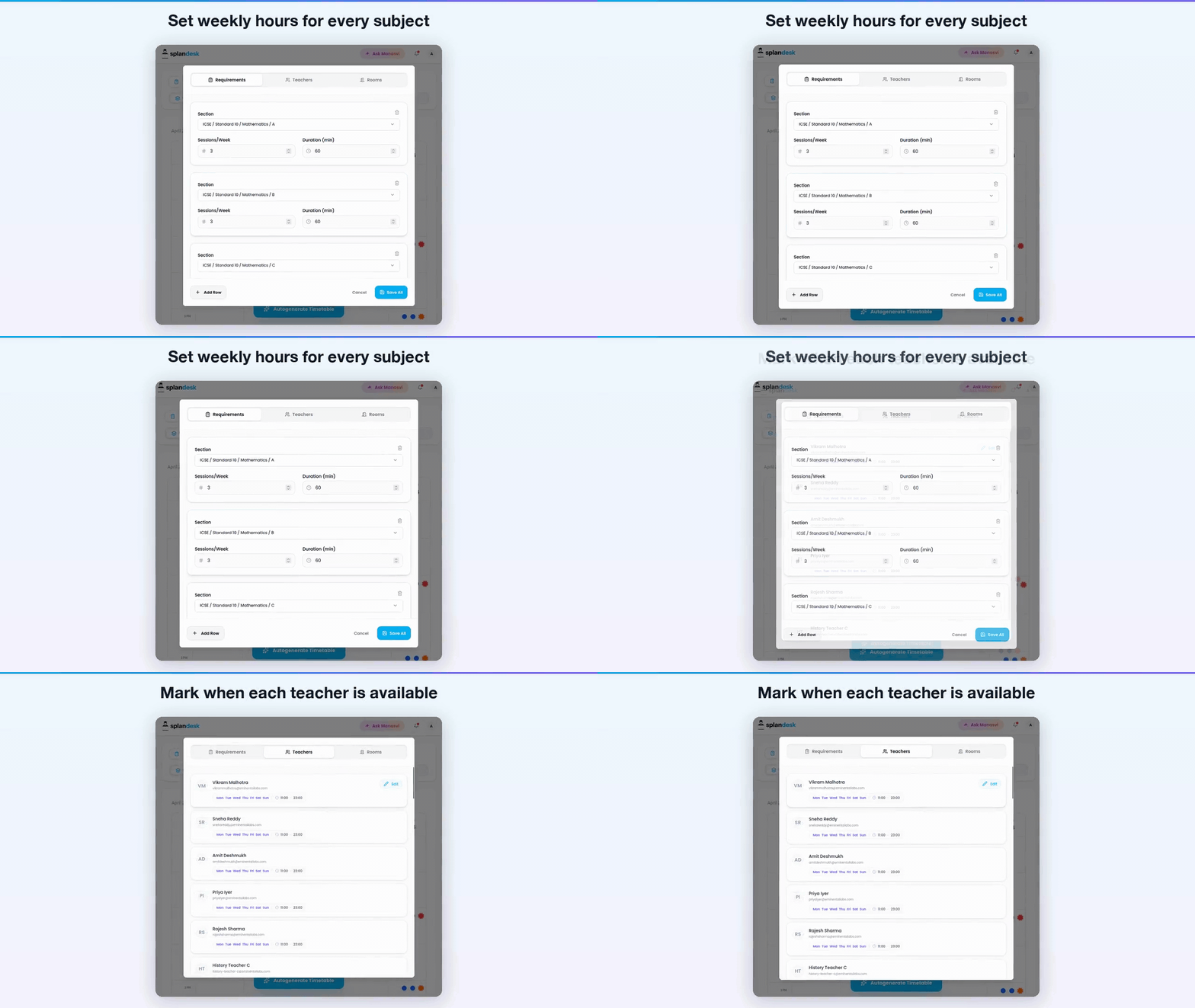
Figure 2. Timetable generation in Splandesk: batches, teachers and rooms resolved together.
Friction 3: Generic AI does not know your syllabus
A general-purpose assistant can write a plausible quiz. It cannot know which chapter a batch finished last week, how a board's marking scheme weights a topic, or which question types your institute has already used this term.
The result is output that needs checking line by line, which erases the time saved. Teachers stop trusting it, and quietly go back to writing papers by hand.
What clears it: AI that works from your own structure. Syllabus versions, tagged question banks and past assessments feed the generation, so the draft paper reflects what was actually taught. The teacher reviews and adjusts instead of starting from a blank page.
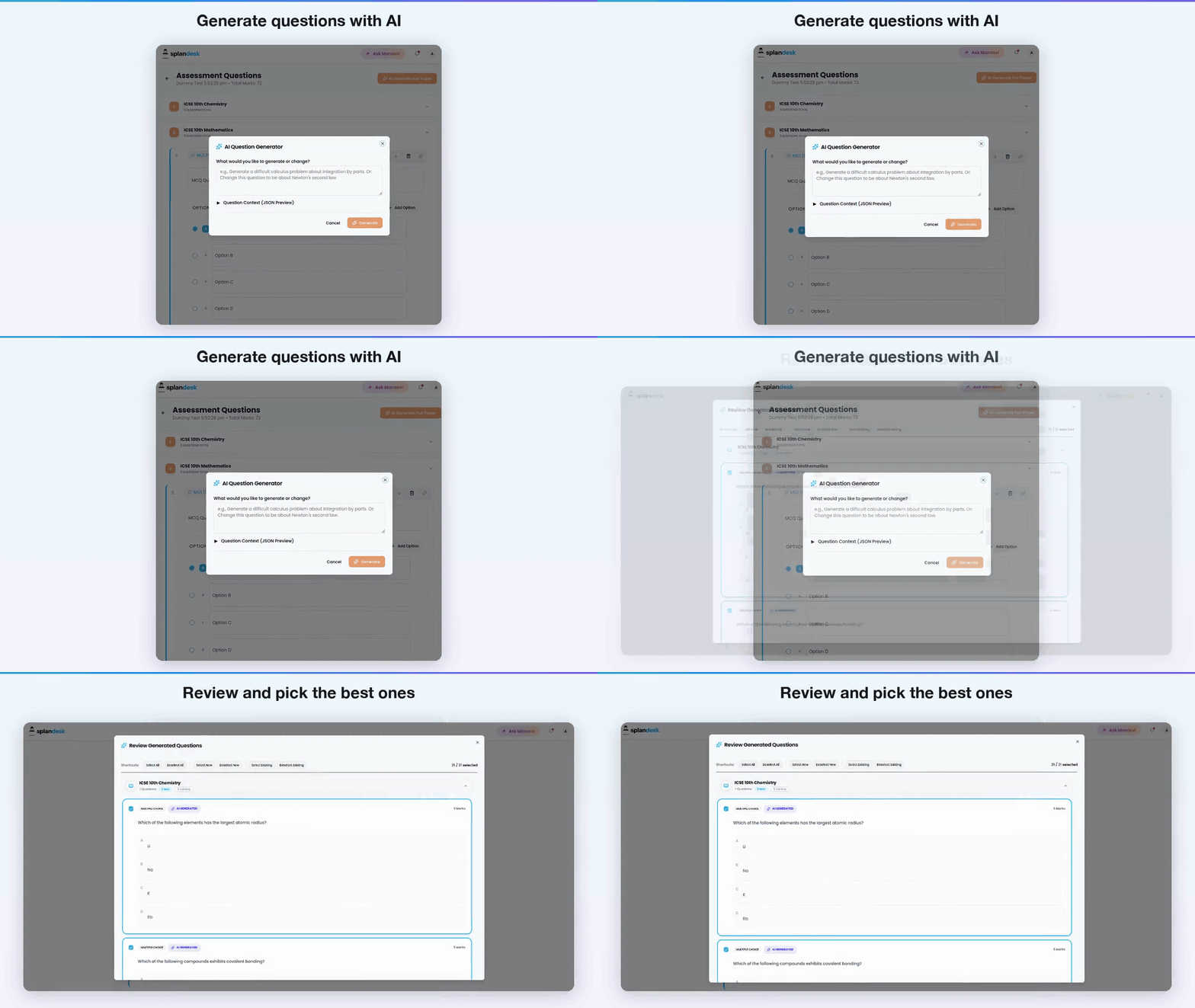
Figure 3. Paper generation from a syllabus-linked question bank.
Friction 4: Software that cannot be shaped
Many institutes have been burned before. A rigid ERP arrived, demanded that the institute change its habits, broke around fee season, and was quietly abandoned. The lesson they took: new software costs more than it says.
A fair concern. Every institute differs. A coaching centre with six rotating batches, a school with fixed periods and a multi-branch operator all run on different rules.
What clears it: a system that starts small and bends to fit. Adopt one module that solves the loudest problem, such as timetabling or OMR grading, then add attendance, fees and analytics when the team is ready. Deployment, integration and customisation should be part of the offer, not a change request.
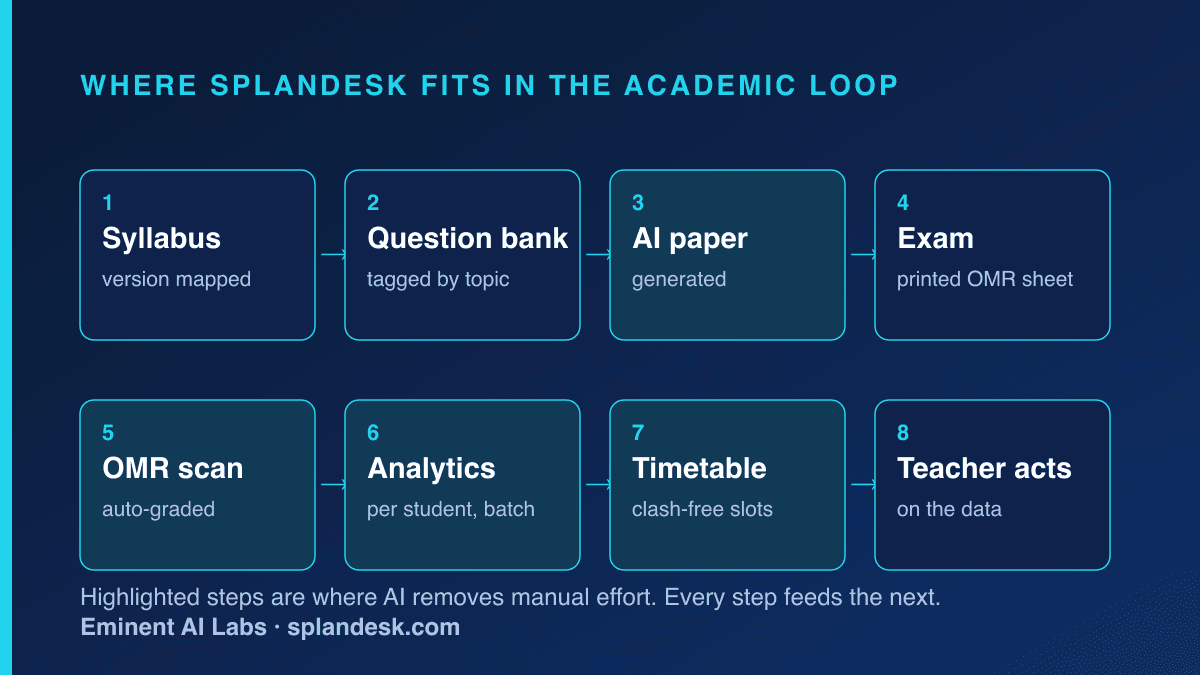
Figure 4. The academic loop. Highlighted steps are where AI removes manual effort.
Friction 5: No baseline, so no ROI
This is the one that quietly kills renewals. A principal is asked to justify the spend. Nobody measured how long papers took before, so nobody can say how much faster they are now. "It feels better" does not survive a budget review.
What clears it: measure before you switch anything on. Pick three or four tasks, time them for two weeks, and write the numbers down. Then compare.
What the numbers look like
We keep our public claims to what we can show. On Splandesk's live site we report:
- 15+ hours saved per teacher, per month
- Up to 10× faster paper creation and results
- 21 connected modules in one system
These are product-level figures, and every institute differs, so your result will depend on your size, your starting process and how much of the system you adopt. Treat them as the range worth testing, not a guarantee.
To make the arithmetic concrete, here is a worked example, using our reported 15 hours as an input. It is illustrative, so replace each number with your own:
15 teachers × 15 hours × ₹500 per hour = ₹1,12,500 of teacher time returned each month
The hourly cost is the number you should argue with. Use the loaded cost of your own staff.
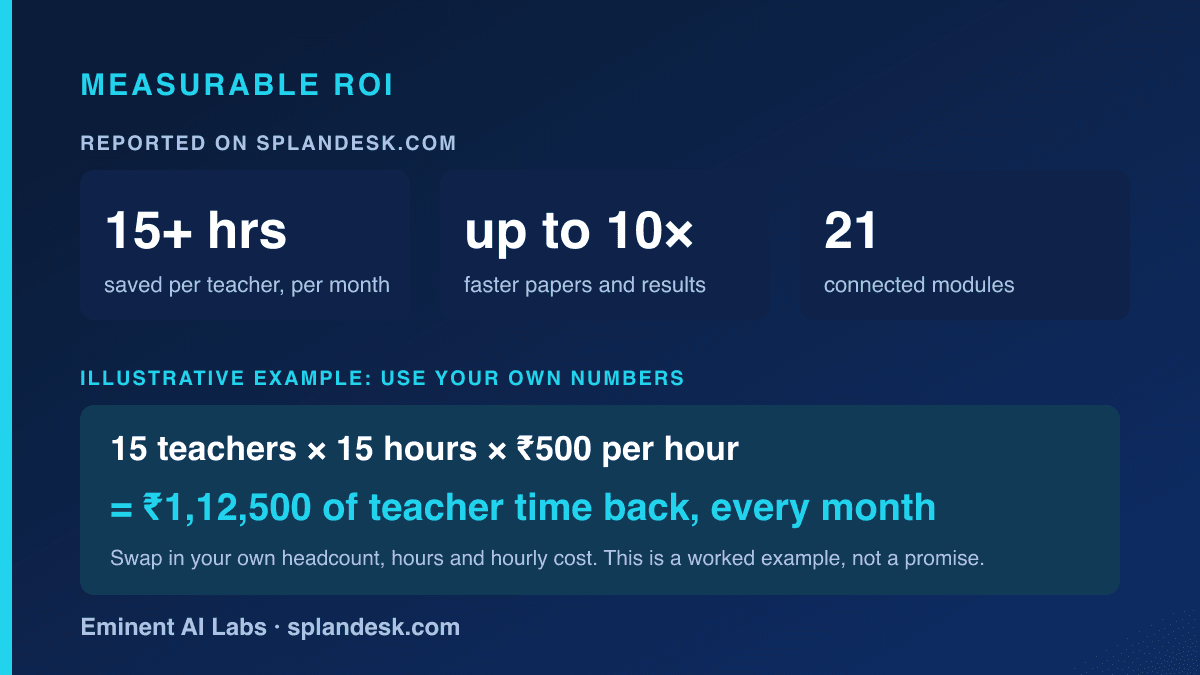
Figure 5. Reported product figures (top) versus an illustrative calculation (bottom).
How to measure it yourself
You do not need a vendor to run this. A simple baseline works:
- Time to build one paper: Stopwatch across three papers (Shows the paper-generation gain)
- Time to grade a batch: Hours from exam to published marks (Shows the OMR and results gain)
- Timetable clashes per term: Count of reschedules (Shows the scheduling gain)
- Admin hours per teacher: Weekly self-report for two weeks (Shows the overall return)
- Staff using the system weekly: Login or activity count (Shows whether adoption is real)
Capture these for two weeks before the change, then again one and three months after. If a number does not move, that is useful information too.
A sensible way to start
If you lead an institute and want to move without a long project, this order works:
- Pick one painful workflow. The one that causes the most complaints, usually timetabling or paper-setting.
- Baseline it. Two weeks of honest timing.
- Run a small pilot. One batch, one branch or one subject.
- Review in a month. Hours, errors, teacher feedback.
- Add the next module only when the first has earned it.
That sequence keeps cost low, keeps the team on side, and gives you a number to take to the budget meeting.
Frequently asked questions
Does this replace our existing ERP? Not necessarily. It can sit alongside, and modules can be adopted one at a time.
Is our data safe? Data handling should be agreed up front, including where it is stored. Ask any vendor this before a pilot.
What if our process is unusual? Customisation is part of the work. Bring the awkward case to the first conversation.
Want to see it on your own timetable?
Tell us about your institute, your batches and your goals, and we will tailor a live demo to your use case: timetables, exams, analytics and fees.
Book a free Splandesk demo, write to contact@eminentailabs.com, or see the product at www.splandesk.com.